

Welcome to DockAxis™
Where innovation meets your gaming needs. At DockAxis, we focus on delivering top-tier docking solutions designed for gamers who demand the best. Our docks seamlessly connect your Steam Deck and ASUS ROG Ally to larger displays, offering enhanced gameplay and convenience. We are confident in the performance and quality of DockAxis, empowering you to
Connect. Play. Excel.

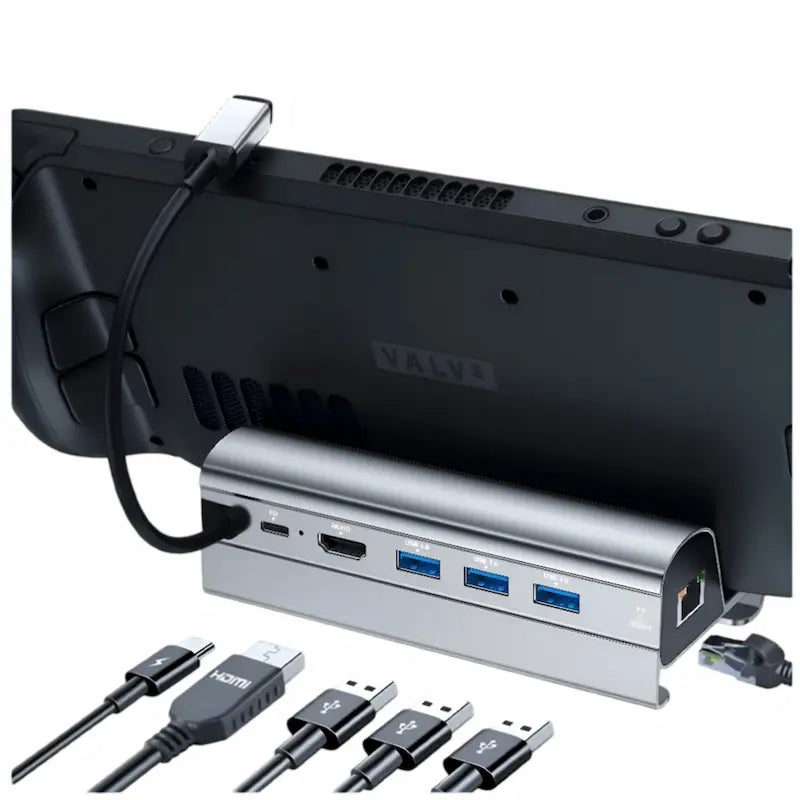
DockAxis Steam Deck Docking Station
Unlock Your Full Gaming Potential with the DockAxis 6-in-1 Docking Station
🎮 Compatible with Steam Deck, ASUS ROG Ally, and Lenovo Legion Go.
🔌 Multifunctional: Connect, charge, and expand effortlessly.
🚀 Performance-Driven: Designed for unmatched gaming experience.

Collapsible content
Specfications
- HDMI Port: 1x HDMI 2.0, supports 4K @ 60Hz output
- Ethernet Port: 1x Gigabit Ethernet, supports 10/100/1000Mbps
- USB Ports: 3x USB 3.0 (5Gbps data transfer speed)
- Charging Power: USB-C PD 60W input, up to 45W output to device
- Material: Premium Aluminum Alloy
Shipping & Returns
Enjoy free, fast shipping across the USA with delivery in 5 to 8 business days. We stand by our products with a 30-day money-back guarantee—if you’re not satisfied, return it hassle-free.
To initiate a return, simply contact us at contact@dockaxis.com—no justification needed. Our team is ready to assist and provide all necessary instructions. Please note that returned items must be shipped back to our warehouse.

Fast Shipping Across the USA

Shop risk-free—your satisfaction is guaranteed

Play with confidence—1 year of coverage on your purchase

Join the top-rated gamers—see why our products get 5-star reviews!
-

John Spencer
DockAxis stationThis dock is awesome! It works like a charm with my ASUS ROG Ally at 30W and even supports Turbo Mode for faster charging. I honestly can't believe the quality for the price—totally worth it. If you're looking for a solid, affordable dock, this is the one to get!
-

Mason Nolan
DockAxis stationSuch an awesome product! Fast delivery, came sealed, and in perfect condition. It worked perfectly straight out of the box and honestly blew my expectations away. If you want something that just works without any hassle, this is the one!
-

Liam Underwood
DockAxis stationVery good dock! My steel deck is in the perfect position for use with a table, keyboard, and mouse. Additionally, the USB 3.0 ports are excellent, allowing me to use an external SSD to run Windows 10. I’ve also tested the Ethernet port, and it works great, providing a stable connection. Overall, it's great to have all these features in one device. I highly recommend it!


FAQ
How can the output be configured to achieve 4K resolution at 60Hz?
Consider using a HDMI 2.0/2.1 Cable that is less than 15 feet long and try to avoid multiple cable adapters. Make sure to manually switch to desktop mode to set up a 4K@60Hz output. Adjust in-game settings if necessary.
What steps to take if the HDMI monitor isn't being recognized?
1. Check your HDMI cable and monitor by directly connecting the monitor to your laptop to see if it works.
2. Ensure the USB-C docking station receives adequate power from the charger.
3. In Steam Deck’s desktop mode, adjust the signal source and resolution to enable HDMI output.
Why doesn't my gaming device have Ethernet when connected to the docking station?
To connect to the wired network, try manually entering desktop mode, turning off WiFi, or adjusting the wired connection priority. If the issue persists, consider checking for server or network device problems.
Why is there no audio output through HDMI on my TV?
1. Verify that your TV supports audio output over HDMI.
2. In the settings, go to Audio, ensure there is an output, and set External Devices as the default audio output device. This will allow audio to transmit to the TV.